


KitchenPal: Pantry Inventory
4.6674.00 Reviews
App Specs
- Version
- 6.1.2
- Updated On
- License
- Free
- Downloads
- 100,000+
- Developer
- iCuisto Pte Ltd
- Categories
- Food & Drink
- Platform
- Android
Screenshots
 Analysis by AppCompare
I like the idea of a kitchen app best when it helps me make a decision I would otherwise put off: what to cook, what to buy, or what needs using soon. KitchenPal brings those jobs together, but the real test is whether keeping its records current feels easier than relying on memory. I’d treat it as a practical organizer, not a magic view into the cupboards; its value depends on the small habit of recording what comes in and what gets used.
Trust starts with clear expectations
KitchenPal is a free food and drink app from iCuisto Pte Ltd, with optional in-app purchases priced from $3.99 to $39.99 per item. It has an average rating of 4.3 from around six thousand ratings, and more than one hundred thousand installs. Those figures can help set context, but they don’t tell me how the app handles personal information or what permissions it requests. I wouldn’t treat popularity as a substitute for checking the choices shown on my own device.
When I try any app that involves household routines, I pay attention to what it asks for during setup and whether each request makes sense for the task I’m doing. Scanning a barcode, for example, is a moment when camera access may be relevant; a request should be understandable in context, and I’d prefer to grant access only when I actually use that function. I also look for privacy and account options in the app and in the phone’s settings before adding a detailed record of my home.
Keep control of what goes into the inventory
A pantry list can reveal everyday patterns: what I buy, what I cook, and how often I shop. That does not make the information inherently sensitive, but it does mean I’d avoid entering anything I don’t need for planning meals. I’d also review the app’s current privacy information and permission prompts rather than assume that a particular storage or sharing arrangement applies.
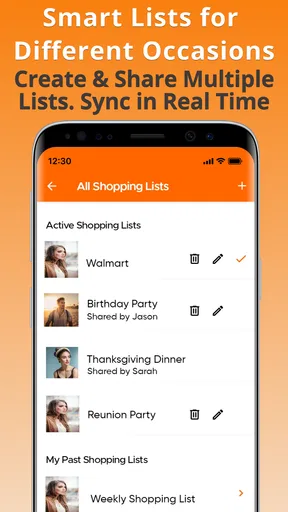
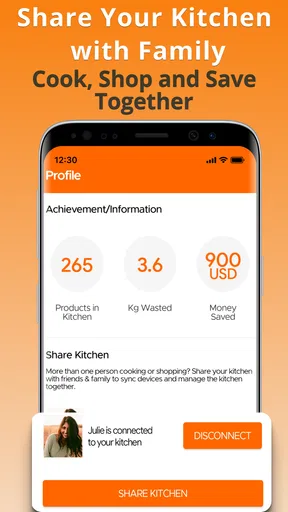
There’s a useful distinction between an app’s visible features and its data practices. KitchenPal’s inventory, recipe, shared-list, and expiry-tracking tools describe what I can do in the kitchen; they don’t, by themselves, explain how account data is handled. Before inviting someone else into a shared routine or relying on the app across devices, I’d check the available account controls and make sure I understand what sharing means in practice.
Where it fits in a real kitchen
I’d start with the items that cause the most friction rather than trying to catalogue every spice and packet in the house on day one. Recording regularly used staples, leftovers, and food with a short use-by window gives the list immediate purpose. If the habit sticks, I can add more detail later. If I try to enter a whole kitchen at once, the setup may feel like another chore before the app has earned a place in my routine.
A cautious verdict
KitchenPal is worth considering if I want one place to connect what I have with what I might cook and what I need to buy. It is less compelling for someone who wants a completely hands-off system or who is uncomfortable keeping household information in an app without first reviewing its privacy and account choices. I’d begin with a small inventory, test the shared-list and recipe workflow, and decide from there whether the convenience is worth maintaining.
Worth Reading Before You Choose

EA SPORTS FC Mobile 26 Is a Bigger Football Game, but It Takes Time

Flipboard Shows What News Apps Must Do Beyond the Feed

Switching to Android Auto Means Rethinking Your Driving Routine

Google Calendar Makes a Crowded Week Easier to Manage

Ludo King Makes the Most of the Minutes Between Plans

Baby Panda World Brings Quick Play to Modern Phones, but Its Game Library Feels Busy
Ever found yourself staring at your pantry, wondering what you can whip up for dinner without making another trip to the grocery store? Enter KitchenPal: Pantry Inventory, a game-changer for anyone looking to streamline their kitchen management. This app is like having a personal assistant who knows exactly what's in your pantry, fridge, and freezer. Let's dive into how this app can revolutionize your cooking experience.
What Makes KitchenPal Stand Out?
First off, KitchenPal: Pantry Inventory serves as a comprehensive tool to help you manage your kitchen inventory like a pro. It’s designed to keep track of everything you have on hand, from canned goods to spices, and even perishables. The app is pretty intuitive, so you don’t need to be a tech whiz to navigate through its features.
Easy Setup and Navigation
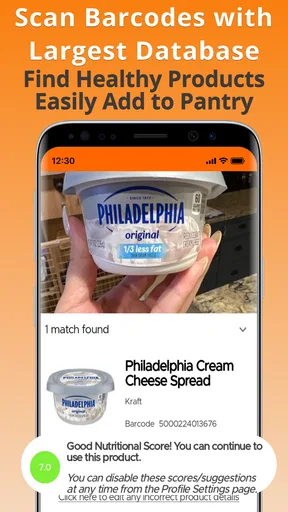
Getting started with KitchenPal is a breeze. The app guides you through a simple setup process where you can input your pantry items manually or even scan barcodes to add products instantly. It’s a nifty feature that saves tons of time, especially if you have a packed pantry. Plus, the app’s interface is user-friendly, making it easy to update your inventory with just a few taps.
Recipe Inspiration at Your Fingertips
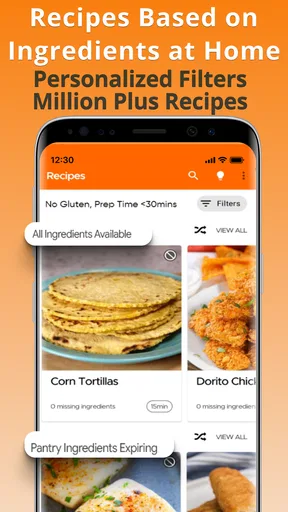
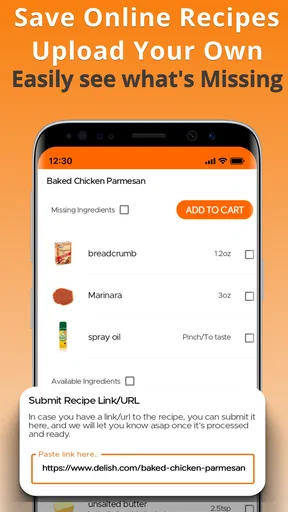
This is where the magic happens! KitchenPal doesn’t just stop at inventory management. It goes a step further by offering recipe suggestions based on what you already have. So, if you’re ever in a pinch and need to put together a quick meal, just check the app for ideas. It’s like having a personal chef whispering suggestions in your ear.
Smart Shopping Lists
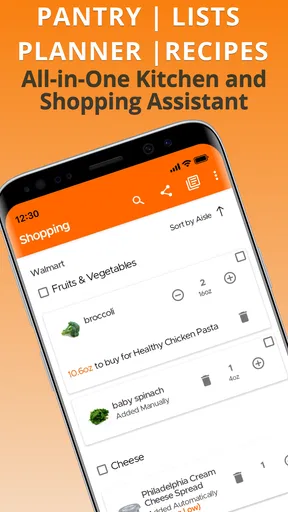
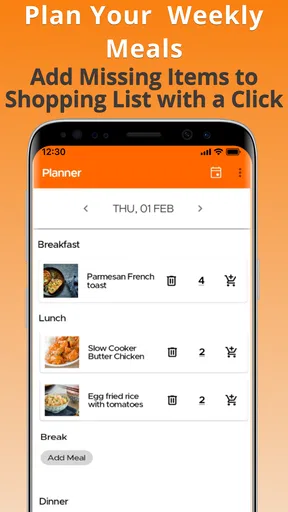
We’ve all been there—standing in the grocery aisle, trying to remember if you’ve run out of pasta. KitchenPal takes the guesswork out of shopping by generating smart shopping lists. As you cook and consume items, the app automatically updates your shopping list, ensuring you’ll never forget essential ingredients again.
Waste Reduction
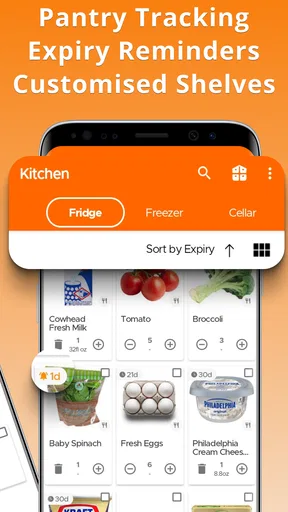
One of the standout features of KitchenPal is its focus on reducing food waste. The app keeps track of expiry dates and sends reminders when items are nearing their use-by date. This means you can prioritize using those items first, helping you cut down on waste and save money. It’s a win-win for your wallet and the environment.
Cross-Device Sync
If you’re like me and often switch between devices, you’ll love KitchenPal’s cross-device sync feature. Whether you’re using your phone, tablet, or computer, your pantry data is always up-to-date and accessible. It’s a seamless experience that ensures you have all your information wherever you go.
Customization and Personalization
KitchenPal allows for a degree of customization that makes it truly personal. You can categorize items, add notes, and even adjust serving sizes in recipes. This personalization ensures the app works for you, catering to your specific needs and preferences.
Making the list useful instead of perfect
A practical way to use the inventory is to think in terms of decisions, not completeness. I’d record ingredients that affect tonight’s dinner or the next shop first: a half-used carton, the last tin of tomatoes, or the produce that needs attention. The list does not need to mirror every shelf to help. A smaller, accurate record is usually more useful than a detailed catalogue that has already fallen out of date.
There is also a trade-off between scanning and entering items by hand. Barcode scanning can make packaged groceries quicker to add, while loose produce, leftovers, and opened ingredients may still call for manual upkeep. I’d use the scanner for repeat purchases and reserve a short check-in after shopping for the items that need dates or notes. That makes the task less likely to become a long inventory session.
Recipes are a starting point, not a meal plan
Recipe suggestions are most helpful when I treat them as prompts. If the app points me toward an idea that uses ingredients on hand, I can check whether I have the time, equipment, and remaining basics the dish needs. A suggested match doesn’t necessarily mean every ingredient is covered or that the recipe suits a dietary restriction, so I’d still read the recipe carefully and make substitutions with common sense.
This is a useful distinction for anyone deciding whether to rely on it for weeknight cooking. KitchenPal can help answer, “What might I make with these ingredients?” It is not the same as planning a balanced menu for the whole week, and it won’t remove the need to judge portions or preferences. I’d use it to get unstuck, especially when one perishable ingredient needs to be used, rather than expect it to make every cooking decision for me.
One ordinary weeknight workflow
Imagine I come home with groceries, add the packaged items I know I’ll use often, and note the fresh food that should be eaten first. A few days later, plans change and I’m not cooking what I expected. Instead of buying more, I check the inventory and recipe ideas, choose a meal around the ingredients that are already there, and move anything missing onto the shared shopping list for the next trip. The advantage is not that the app predicts my week; it gives me a place to check before I shop or let food sit forgotten.
For a household, the shared-list angle can also reduce the familiar handoff problem: one person notices an item is running low, while another is the one heading to the store. The list is most dependable when everyone agrees to add items as they run out rather than assume the inventory will update itself. I’d establish a simple rule—add an item when you finish it, then check the list before leaving—so the app supports the routine instead of creating a second source of truth.
Who will get the most from it
I can see this fitting people who cook at home regularly, buy many of the same staples, or share grocery errands with someone else. It may be especially useful if expiry reminders help you notice ingredients that would otherwise disappear behind newer groceries. The strongest payoff comes when inventory, recipes, and shopping are connected in your habits; using only one feature occasionally may not justify the effort of maintaining a list.
On the other hand, I’d skip it if I rarely cook, prefer a paper list, or find updating a digital inventory more irritating than checking the cupboard. A simple notes app may be better for someone who only needs to remember milk and bread. Likewise, people who want a tightly structured meal planner, rather than an ingredient-led prompt, may prefer a tool built specifically around scheduling meals. KitchenPal’s appeal is the link between household stock and food decisions, not a promise to suit every planning style.
What to check before making it a household habit
Because the app combines inventory with shared shopping and device access, I’d test the everyday flow before moving the whole household onto it. Add a few groceries, check whether the names and categories are easy to understand, and see whether the list remains convenient while shopping. If more than one person will use it, confirm the sharing and account controls in the current app before relying on them, and avoid entering extra household details that do not help with meals or shopping.
It is also sensible to check the current purchase screen before assuming every feature is included at no cost. The app itself is free to download, but it offers optional in-app purchases, so I’d review what a purchase unlocks and whether it matches a real need before paying. KitchenPal is rated for Everyone, and its current version is 6.0.4; it requires Android 7.0 or later. Those practical details help with compatibility, while the app’s usefulness still comes down to whether its workflow fits the way you shop and cook.
In conclusion, KitchenPal: Pantry Inventory is more than just an app; it’s an essential tool for anyone who wants to manage their kitchen more efficiently. Whether you’re a seasoned chef or someone who dreads cooking, this app has something to offer. By keeping track of your inventory, suggesting recipes, and reducing waste, KitchenPal transforms the way you interact with your kitchen. Give it a try, and you might just find yourself enjoying cooking a little more each day!
Pros
- Intuitive interface for easy navigation.
- Barcode scanner for quick item entry.
- Recipe suggestions based on ingredients.
- Multiple user accounts for shared lists.
- Offline access to inventory and recipes.
Cons
- Limited integration with other apps.
- Occasional glitches with barcode scanning.
- Recipe database not region-specific.
- Requires manual input for expiration dates.
- In-app ads can be distracting.
FAQs for KitchenPal: Pantry Inventory
What is KitchenPal: Pantry Inventory and how does it work?
KitchenPal: Pantry Inventory is a comprehensive app designed to help users manage their pantry efficiently. It allows you to track the items in your pantry, create shopping lists, and find recipes based on the ingredients you have. By scanning barcodes or manually entering items, you can keep your pantry organized and reduce food waste.
Can KitchenPal help me with meal planning and recipe suggestions?
Yes, KitchenPal offers meal planning and recipe suggestions tailored to the ingredients you have in stock. The app suggests recipes based on what's available in your pantry, helping you make the most of your existing supplies. This feature is perfect for users looking to minimize waste and avoid unnecessary shopping trips.
Does KitchenPal support barcode scanning for inventory management?
KitchenPal includes a barcode scanning feature that simplifies the process of adding items to your pantry inventory. By scanning the barcode of a product, the app automatically inputs the item details, making it quick and easy to update your pantry list and ensuring that your inventory is always accurate.
Is KitchenPal available for both Android and iOS devices?
Yes, KitchenPal is available for download on both Android and iOS platforms. You can find the app on the Google Play Store for Android devices and the Apple App Store for iOS devices. This cross-platform availability makes it accessible to a wide range of users who wish to streamline their kitchen management.
How does KitchenPal help in reducing food waste?
KitchenPal aids in reducing food waste by allowing users to track expiration dates and quantities of pantry items. The app sends notifications to remind you of upcoming expiration dates, ensuring that you use products in a timely manner. Additionally, by suggesting recipes based on available ingredients, it helps in utilizing all stored items efficiently.


